Agent coding sessions that outlast your terminal.
Salaam is a persistent session service for terminal coding and unattended agent work, built on Pi. Each session, with its approvals and results, lives on your machine, so you can close the terminal and pick it up later.
YOU 09:41
Fix the parser and prove the edge cases.
SALAAM 09:42
I’ve prepared the patch in the owned workspace.
The next operation is ready for your review.
Example session, an illustrative mock-up · controls in the terminal guide
How it works
One service, any terminal. The terminal, SSH and your editor are clients; the service keeps the record.
- 01
Start the local service.
sal service start runs a service on your machine that owns your sessions. The default provider is offline, so your first session needs no API key and makes no paid requests.
Your first session - 02
Attach the terminal.
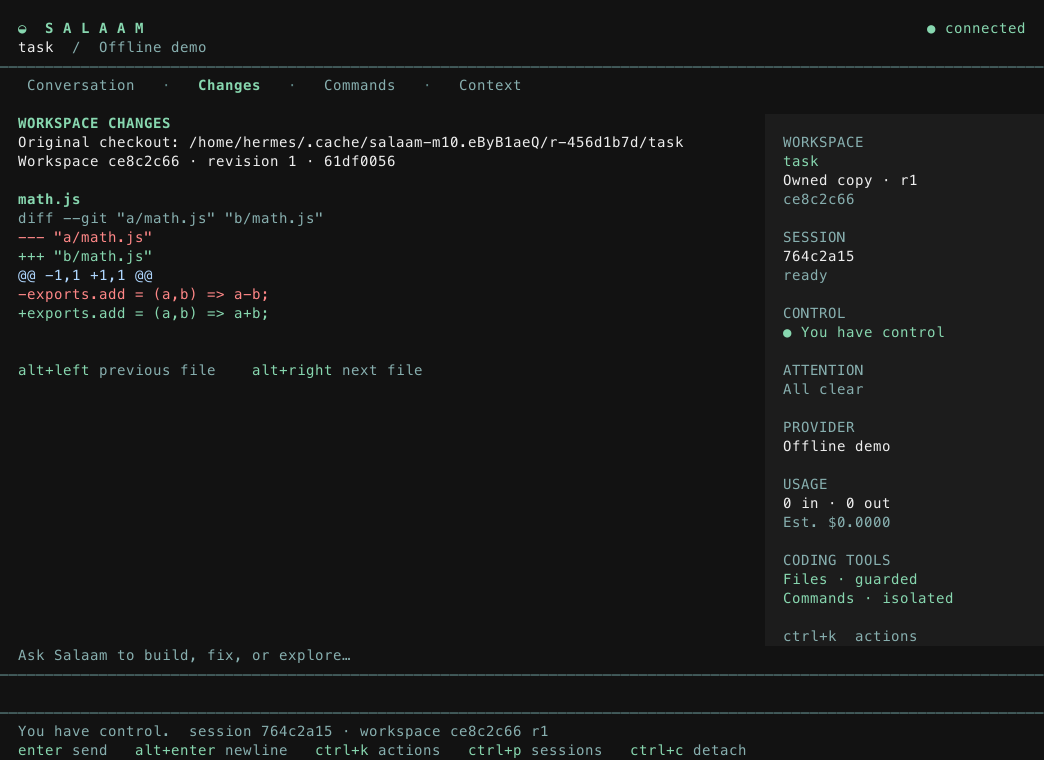
sal attach opens the terminal interface: a composer, reviewed changes, command logs, an operator inbox, and approvals on Ctrl O. Night and Paper themes.
Meet the terminal - 03
Detach and come back.
Close the terminal and the session keeps going. Reattach from another terminal, over SSH to a host you already have access to, or from an editor that speaks ACP (the Agent Client Protocol). Reconnecting replays what happened; it does not resend your instruction.
Ways to connect


What it's like to use
Say you ask it to fix a parser.
With coding switched on, Salaam's Pi worker edits a copy of your project in a workspace the service owns, not your checkout. Before the patch is applied, the operation waits in your approval inbox, and your approval covers exactly the arguments and target you reviewed. If you made it a checked task, the model saying "done" is not enough: the checks have to pass first. You can detach at any point and reattach later to the same state.
You can also hand a step to a specialist (an explorer, builder, reviewer or tester) whose draft stays private until you integrate it, or to a Claude, Codex or Gemini harness route. Today all three harness routes run on your host's Claude API key and Sonnet 4.6; Codex and Gemini are translated to that backend, not run against OpenAI or Google models. They need Docker and a prepared runtime bundle.
Salaam can also ask another agent on the network for an opinion over A2A (the Agent2Agent protocol), including documented Hermes and OpenClaw routes. Those peers return analysis, never patches. For unattended work there are jobs and recurring schedules; each run gets a fresh workspace and explicit overlap rules. It is not an open-ended background cron.
Read about coding
Run it yourself
Install v0.0.2.
Needs Node 26.7.0 and npm 11.19.0, both exactly. macOS and Linux; Windows is untested. Coding commands need Docker. The installer checks the release's SHA-256 before installing.
curl -fsSL https://salaam.sh/install.sh | sh -s -- --version 0.0.2Read the installer or see the installation guide.
Then start a service and your first session:
sal service start --state /tmp/salaam-try
sal session create --cwd "$PWD" --state /tmp/salaam-try
sal attach SESSION_ID --state /tmp/salaam-try
Replace SESSION_ID with the ID the second command prints. It runs on your own machine, under your own OS account.
Where it runs today
Salaam is early software.
- It is for one trusted OS account on one machine; there is no multi-tenant API.
- If the service or worker dies, work in flight is interrupted and you continue it explicitly; nothing is replayed for you.
- SSH needs a host you can already reach and Salaam installed there; it provisions no servers and copies no credentials.
- Saved provider keys are stored as permission-protected plaintext, and live provider requests, including Claude, may be billable.
- Harness routes all run on Claude and Sonnet 4.6.
- The approval-binding checks were verified in the project's own local run (2026-10-17, macOS arm64), not independently.
- Some features on main, such as running coding without Docker and MCP tool admission, are not in v0.0.2.